Forms › W-9
Fill out Form W-9 online
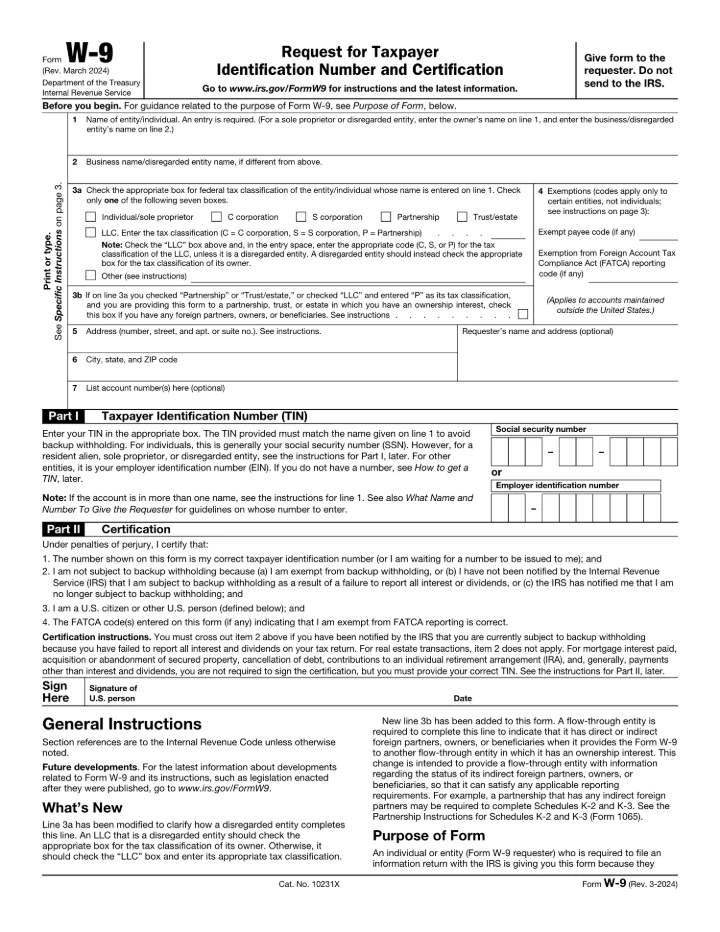
Fill out IRS Form W-9 (Request for Taxpayer Identification Number and Certification) for free in your browser, then download it. Nothing is uploaded — your name, address, and TIN stay on your device.
Editing is free. Downloading your finished file is a one-time $1.97 per document, refundable for 7 days.
What is the W-9?
Form W-9 is used to give your correct Taxpayer Identification Number (SSN or EIN) to a person or company that pays you, so they can report the income to the IRS. Contractors and freelancers are commonly asked to complete one.
Fill the W-9 in 3 steps
Get the form
Click “Get form” — the official PDF opens in the editor, with no upload.
Fill it in
Click the highlighted fields and type your details, or add text anywhere on the page. Everything stays on your device.
Download
Save the completed form to your device.
How to fill out the W-9, line by line
A U.S. person (a U.S. citizen, resident alien, or U.S. business, trust, or estate) fills in Form W-9 when a business, bank, broker, or client asks for it. The requester uses your name and taxpayer identification number (TIN) to file information returns such as Form 1099-NEC, 1099-INT, or 1099-MISC. Give the completed form back to the person who asked for it. Do not send it to the IRS. If you are a nonresident alien or a foreign entity, don't use Form W-9; give the requester the right Form W-8 or Form 8233 instead.
- Line 1 — Name of entity/individual. This line is required. Enter the name that matches your tax return. A sole proprietor enters their own name here, and a disregarded entity (such as a single-member LLC) enters the owner's name here, never the LLC's name.
- Line 2 — Business name/disregarded entity name. Enter your business, trade, or "doing business as" (DBA) name, or the disregarded entity's name, if it is different from line 1. Leave it blank if you have none.
- Line 3a — Federal tax classification. Check only one of the seven boxes for the person or entity named on line 1: Individual/sole proprietor, C corporation, S corporation, Partnership, Trust/estate, LLC, or Other. A disregarded LLC checks the box for its owner's classification, not the LLC box.
- Line 3a — LLC code. If the LLC is not disregarded, check the LLC box and type its tax classification in the entry space: C for C corporation, S for S corporation, or P for partnership.
- Line 3b — Foreign partners, owners, or beneficiaries. Most people leave this blank. Check it only if you checked Partnership or Trust/estate (or LLC with code P), you are giving this form to a partnership, trust, or estate you own an interest in, and you have any foreign partners, owners, or beneficiaries.
- Line 4 — Exemptions. Individuals and sole proprietors are generally not exempt, so they leave both boxes blank. Certain entities enter an exempt payee code (1 to 13) and, only for accounts kept outside the United States, a FATCA exemption code (A to M), as listed in the instructions. If you are unsure whether a code applies, ask the requester.
- Lines 5 and 6 — Address. Enter your street address with apartment or suite number on line 5, and your city, state, and ZIP code on line 6. This is where the requester will mail your information returns. If it differs from the address they already have, write "NEW" at the top.
- Requester's name and address, and Line 7 — Account numbers. Both are optional. You can enter the requester's name and address in the box on the right, and list any account numbers on line 7.
- Part I — Taxpayer Identification Number (TIN). Enter one number only, and it must match the name on line 1. Individuals usually enter their social security number (SSN); a resident alien who can't get an SSN enters their ITIN in the SSN boxes; entities enter their employer identification number (EIN). A sole proprietor may use either their SSN or EIN, and a disregarded single-member LLC uses the owner's SSN or EIN.
- Part I — If you don't have a TIN yet. Apply for one right away (Form SS-5 for an SSN, Form W-7 for an ITIN, Form SS-4 or irs.gov/EIN for an EIN). Write "Applied For" in the TIN space, sign and date the form, and give it to the requester. For interest and dividend payments (and certain payments on readily tradable instruments) you generally have 60 days to supply the number before backup withholding starts. For other payments, backup withholding can apply until you give the number.
- Part II — Certification, signature, and date. Read the four certification statements. If the IRS has told you that you are currently subject to backup withholding for underreporting interest and dividends, cross out item 2 before you sign. Then sign and date. For a joint account, only the person whose TIN is in Part I signs; for a disregarded entity, the person named on line 1 signs.
Common mistakes on the W-9
- Putting the LLC's name on line 1. A single-member LLC that is disregarded for tax purposes must put the owner's name on line 1 and the LLC's name on line 2. The name on line 1 should never be a disregarded entity.
- Name and TIN that don't match. The number in Part I must belong to the name on line 1. A mismatch, such as a business name with the owner's SSN entered on the wrong line, can lead to backup withholding.
- Checking more than one box on line 3a. Check only one box. A non-disregarded LLC checks only the LLC box and writes C, S, or P; it does not also check the corporation or partnership box.
- Using your married name without updating Social Security. If you changed your last name and haven't told the Social Security Administration, enter your first name, the last name on your social security card, and your new last name.
- Adding exemption codes you don't qualify for. Individuals and sole proprietors are generally not exempt from backup withholding. Corporations are exempt only for some payment types, as the chart in the instructions shows, and S corporations must not enter a code for broker transactions. The FATCA code only matters for accounts kept outside the United States.
- Using a W-9 when you are a foreign person. Form W-9 is only for U.S. persons. A nonresident alien, a foreign entity, or a disregarded U.S. entity with a foreign owner should use the right Form W-8 (or Form 8233) instead.
- Leaving the TIN blank while you wait for a number. If you've applied for a TIN but don't have it yet, write "Applied For" in the TIN space and still sign and date the form. Returning the form with no TIN may lead to backup withholding.
- Sending the form to the IRS. The IRS does not collect Form W-9. Return it only to the person or business that asked for it, and send it to them in a secure way, since it contains your SSN or EIN.
Filling it in this editor
- Every line on page 1 is a fillable field, including the line 3a code box, the Exempt payee and FATCA code boxes, and separate boxes for each group of SSN or EIN digits, so you can click each one and type.
- The line 3a boxes and the line 3b box are checkboxes: click once to tick and again to clear, and tick only one box on line 3a.
- The form has no field for the signature or date, so use the Sign tool to draw or type your signature on the signature line and Add text to type the date next to "Date"; whether the requester accepts a signature added this way is up to them, so ask if you're not sure.
- There is no field for crossing out item 2 or for writing "NEW" or "Applied For" outside a field; use Add text for the words, and if you must cross out item 2, ask the requester how they want it marked or do it on a printed copy.
Written for the Rev. March 2024 edition and checked against the official instructions on 2026-10-28: About Form W-9 (IRS) · Form W-9 (Rev. March 2024), with General and Specific Instructions (IRS PDF) · Instructions for the Requester of Form W-9 (Rev. March 2024) (IRS PDF) · Instructions for the Requester of Form W-9 (IRS, HTML). This guide explains the form; it isn't legal or tax advice.
Common questions
Is filling out the W-9 here free?
Filling it in is free, with no signup and no watermark. Downloading the completed form is a one-time $1.97 — not a subscription, and refundable for 7 days.
Do you upload my form to a server?
No. The form opens and is filled entirely in your browser. Nothing is uploaded, so your personal and financial details stay on your device.
Is this the official form?
Yes. This is the official, current W-9 published by the U.S. government, which is public domain. You fill the genuine document.
Related forms
W-4
Form W-4 tells your employer how much federal income tax to withhold from your paycheck. You complete it when you start a job or when your situation changes.
1040
Form 1040 is the standard federal income tax return individuals file each year to report income, claim deductions and credits, and calculate tax owed or refunded.
1099-NEC
Form 1099-NEC reports nonemployee compensation — what a business pays independent contractors and other nonemployees for services. For payments made in 2026 and later, you file one for each person paid $2,000 or more in the year (the threshold was $600 through 2025).