Forms › I-9
Fill out Form I-9 online
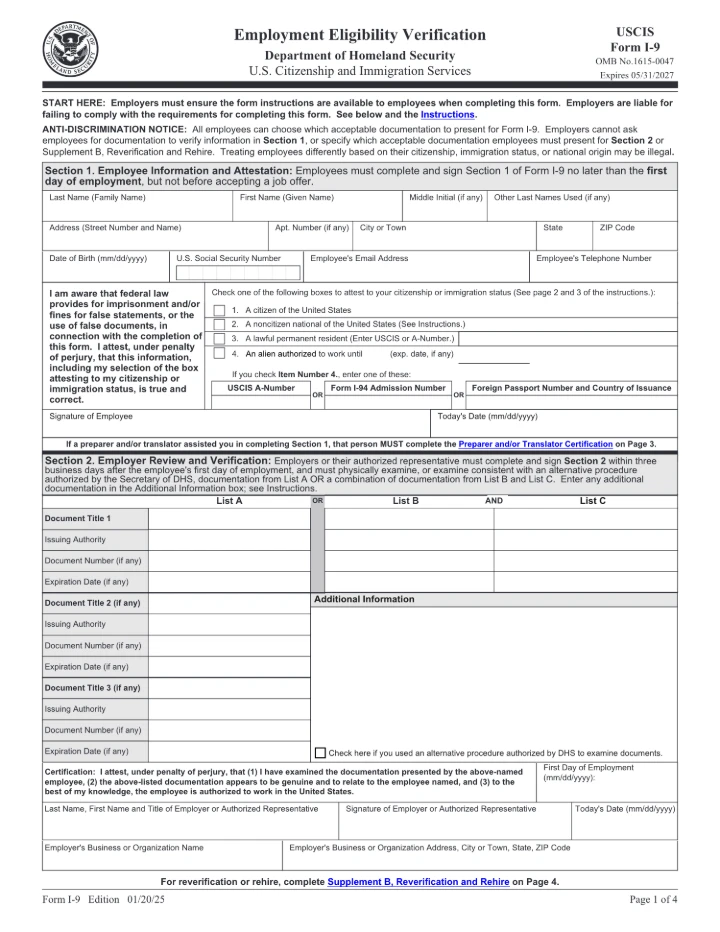
Fill out USCIS Form I-9 (Employment Eligibility Verification) for free in your browser and download it. Nothing is uploaded — sensitive employee data stays local. One exception: Section 1's State box is a dropdown this editor can't open, and text typed over it stays hidden under the box in the download, so pick the state after downloading, in a PDF reader that opens dropdowns, such as Adobe Acrobat Reader.
Editing is free. Downloading your finished file is a one-time $1.97 per document, refundable for 7 days.
What is the I-9?
Form I-9 verifies the identity and employment authorization of people hired to work in the United States. Both employees and employers complete sections of it.
Fill the I-9 in 3 steps
Get the form
Click “Get form” — the official PDF opens in the editor, with no upload.
Fill it in
Click the highlighted fields and type your details, or add text anywhere on the page. Everything stays on your device.
Download
Save the completed form to your device.
How to fill out the I-9, line by line
Every new employee in the United States, citizens included, fills in and signs Section 1. The employer, or someone the employer authorizes, then checks the employee's original documents and completes Section 2. Supplement A is only for a preparer or translator who helped with Section 1, and Supplement B is only for reverification, rehire or a legal name change. The finished form stays with the employer. Don't send it to USCIS or ICE.
- Section 1 — Name. Enter your current legal name: Last Name (Family Name), First Name (Given Name), Middle Initial, and any Other Last Names Used, such as a maiden name. Keep any hyphens or punctuation. If you have only one name, put it in Last Name and type "Unknown" in First Name.
- Section 1 — Address. Enter your street number and name, Apt. Number (if any), City or Town, State and ZIP Code. Your full address is required. The State box is a dropdown; see the editor tips below.
- Section 1 — Date of birth, SSN, email and phone. Date of Birth is required, written mm/dd/yyyy. The Social Security number is voluntary unless your employer uses E-Verify. Never enter an ITIN there. Email and telephone are optional. If your employer uses E-Verify, giving them lets you receive notices about your E-Verify case.
- Section 1 — Citizenship or immigration status (boxes 1-4). Tick exactly one box. Box 1 is a U.S. citizen. Box 2 is a noncitizen national (for example, someone born in American Samoa). Box 3 is a lawful permanent resident, including conditional residents, and you must enter your 7- to 9-digit USCIS Number/A-Number. Refugees and asylees should not tick box 3. They tick box 4.
- Section 1 — Box 4 details. If you tick box 4, enter the date your work authorization expires. If it was automatically extended, use the extended date. If it has no expiration date (for example, refugees and asylees), enter N/A. Then fill in ONE of the three numbers: USCIS A-Number, Form I-94 Admission Number (11 digits), or Foreign Passport Number and Country of Issuance.
- Section 1 — Signature and today's date. Sign and date Section 1 no later than your first day of work, and not before you accept the job offer. Use the actual date you sign. Do not back-date it. USCIS says this fillable form must be printed and signed by hand, so sign the printed copy in ink. Sign it yourself even if someone helped you fill it in.
- Supplement A (page 3) — Preparer and/or translator. Fill this in only if someone helped you complete or translate Section 1. The helper enters the employee's name from Section 1 at the top. Each helper fills in their own block with a signature, date, name and address. If no one helped, the employer doesn't need page 3.
- Showing your documents (employee). Within three business days after your first day of work, give your employer original, unexpired documents. That is either one item from List A, or one from List B plus one from List C (page 2). You choose which ones. If the job lasts less than three business days, show them on day one. Photocopies are not accepted, except a certified copy of a birth certificate.
- Section 2 — Document details (employer). First, review Section 1. If you find an error, the employee must correct it and initial and date the change. Then fill in either the List A column or the List B and List C columns, never both. For each document, enter the document title, issuing authority, document number and expiration date (if any). Common abbreviations such as "DL" or "SSA" are fine. If List A is a combination of documents (such as a foreign passport with Form I-94), use Document Title 2 and 3.
- Section 2 — Additional Information and alternative procedure box. Use Additional Information for anything else required, such as extra documents, receipt follow-ups or automatic extensions, and initial and date each note. Tick "Check here if you used an alternative procedure authorized by DHS" only if you examined the documents remotely under the DHS procedure. That procedure is open only to employers in good standing with E-Verify.
- Section 2 — First Day of Employment and certification. Enter the date the employee began, or will begin, work for pay (mm/dd/yyyy). Then enter the last name, first name and title of the person completing Section 2, a signature, today's date, and the business name and address. Finish Section 2 within three business days after the first day of work. For a job of less than three business days, finish it by day one.
- Supplement B (page 4) — Reverification and rehire. Employers only. Use it when work authorization must be reverified, when you rehire someone within three years of the original Form I-9, or to record a legal name change. Enter the employee's name at the top. Each event gets its own block: date of rehire, new name, a List A or List C document (for reverification), and the employer's name, signature and date. Do not reverify U.S. citizens, noncitizen nationals, or permanent residents who presented a Permanent Resident Card.
- Keeping the form. The employer keeps the completed form and any supplement pages, plus any copies of documents it made. Keep them for three years after the first day of work or one year after employment ends, whichever is later. The page 2 Lists of Acceptable Documents and the instructions don't need to be kept.
Common mistakes on the I-9
- Leaving Section 1 basics blank. USCIS lists a missing name, other last names used, address or date of birth as a common Section 1 error. These are required even when other fields don't apply.
- Ticking a status box without the matching number. Box 3 needs a USCIS Number/A-Number. Box 4 needs an expiration date (or N/A) plus one of the A-Number, I-94 number, or foreign passport number and country. Leaving these out is a common error.
- Refugees or asylees ticking "lawful permanent resident". The instructions say refugees and asylees should choose box 4, "An alien authorized to work," not box 3, and enter N/A if their authorization has no expiration date.
- Missing signature, date or deadline. An unsigned or undated Section 1, or one finished after the first day of work, is a common error. The same goes for a Section 2 that is unsigned, missing the first day of employment, or finished after the third business day.
- Recording too many or too few documents. Section 2 needs one List A document, or one List B plus one List C. Fill in the title, issuing authority, number and expiration date for each. The employer may not ask for more documents or for specific ones, because the employee chooses what to present.
- Employer fixing the employee's Section 1. Only the employee may correct Section 1, and they must initial and date the change. To fix Section 2 or Supplement B, the employer draws a line through the error, writes the correct information, and initials and dates it, without hiding the change.
- Each helper not completing their own Supplement A block. Each preparer or translator must fill in a separate certification block with their name, address, signature and date. A shared or incomplete block is a listed common error.
- Sending the form to the government. Form I-9 is not filed with USCIS or ICE. The employer keeps it on file and shows it only if DHS, the Department of Labor, or the Department of Justice asks to inspect it.
Filling it in this editor
- The State box in Section 1 is a dropdown this editor can't open, and text typed over it stays hidden under the box in the download. Choose the state in a PDF reader that opens dropdowns, or write it in by hand on the printed form. The four State boxes in Supplement A on page 3 are the same kind of dropdown.
- The status boxes 1-4 in Section 1 and the alternative procedure boxes in Section 2 and Supplement B are normal checkboxes. Click once to tick one. In Section 1, tick only one box.
- Type every date as mm/dd/yyyy, and in Section 2 type document titles and issuing authorities as plain text, since in this copy those are ordinary text fields, not lists.
- Don't use the Sign tool on this form. USCIS says people using this fillable form must print it and sign by hand, because a typed or added signature doesn't meet DHS rules for electronic I-9s. Type everything else, then print and sign in ink.
Written for the 01/20/25 edition and checked against the official instructions on 2026-10-28: I-9, Employment Eligibility Verification (USCIS), including the note on signing the fillable form · Instructions for Form I-9, edition 01/20/25 (USCIS) · Self-Audits and Correcting Mistakes, I-9 Central (USCIS) · Remote Examination of Documents, I-9 Central (USCIS) · Form I-9 Acceptable Documents, I-9 Central (USCIS). This guide explains the form; it isn't legal or tax advice.
Common questions
Is filling out the I-9 here free?
Filling it in is free, with no signup and no watermark. Downloading the completed form is a one-time $1.97 — not a subscription, and refundable for 7 days.
Do you upload my form to a server?
No. The form opens and is filled entirely in your browser. Nothing is uploaded, so your personal and financial details stay on your device.
Is this the official form?
Yes. This is the official, current I-9 published by the U.S. government, which is public domain. You fill the genuine document.