Forms › W-4
Fill out Form W-4 online
Fill out IRS Form W-4 (Employee's Withholding Certificate) for free in your browser and download it. Everything stays on your device — no upload.
Editing is free. Downloading your finished file is a one-time $1.97 per document, refundable for 7 days.
What is the W-4?
Form W-4 tells your employer how much federal income tax to withhold from your paycheck. You complete it when you start a job or when your situation changes.
Fill the W-4 in 3 steps
Get the form
Click “Get form” — the official PDF opens in the editor, with no upload.
Fill it in
Click the highlighted fields and type your details, or add text anywhere on the page. Everything stays on your device.
Download
Save the completed form to your device.
How to fill out the W-4, line by line
Employees fill in Form W-4 so their employer knows how much federal income tax to withhold from each paycheck. Your employer asks for it when you start a job, and you can give a new one any time your situation changes. Give it to your employer (usually HR or payroll), not to the IRS. The employer keeps it and sends a copy to the IRS only if the IRS asks for one.
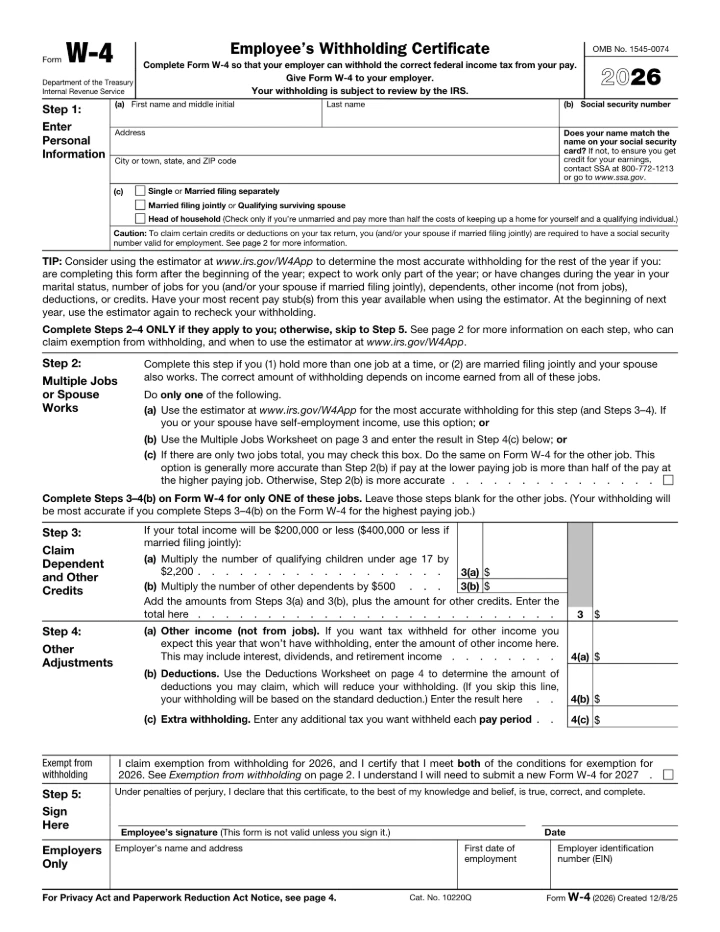
- Step 1(a) — Name and address. Enter your first name and middle initial, last name, street address, and city, state and ZIP code. The form asks whether your name matches your Social Security card. If it doesn't, contact the SSA at 800-772-1213 or ssa.gov so you get credit for your earnings.
- Step 1(b) — Social Security number. Enter your Social Security number in the box at the top right. The form notes that some credits and deductions require a Social Security number that is valid for employment.
- Step 1(c) — Filing status. Tick one box: Single or Married filing separately; Married filing jointly or Qualifying surviving spouse; or Head of household. Pick the filing status you expect to use on your tax return. Head of household is only for people who are unmarried and pay more than half the cost of keeping up a home for themselves and a qualifying individual.
- Decide whether Steps 2–4 apply. Fill in Steps 2, 3 and 4 only if they apply to you; otherwise skip to Step 5. If you only complete Steps 1 and 5, your employer withholds based on your filing status's standard deduction and tax rates, with no other adjustments. The IRS Tax Withholding Estimator (irs.gov/W4App) gives the most accurate result, especially if you start mid-year, work only part of the year, or have changes in your family or income.
- Step 2 — Multiple jobs or spouse works. Use this step if you hold more than one job at the same time, or if you are married filing jointly and your spouse also works. Do only one of these: (a) use the online estimator (use this option if you or your spouse have self-employment income), (b) use the Multiple Jobs Worksheet on page 3 and put the result in Step 4(c), or (c) if there are only two jobs in total, tick the Step 2(c) box on the Form W-4 for both jobs. The form says option (c) is generally more accurate than (b) when the lower-paying job pays more than half of the higher-paying job.
- Page 3 — Multiple Jobs Worksheet (only if you chose Step 2(b)). Complete the worksheet on only one Form W-4, ideally the one for the highest paying job. Find the amount from the tables on page 5 for your filing status (line 1 for two jobs, lines 2a–2c for three jobs). Enter the number of pay periods per year on line 3, then divide to get line 4. Line 4 goes into Step 4(c). Keep the worksheet for your records.
- Step 3 — Dependents and other credits. If your total income will be $200,000 or less ($400,000 or less if married filing jointly), multiply the number of qualifying children under age 17 by $2,200 on line 3(a), and the number of other dependents by $500 on line 3(b) (2026 form amounts). Add those two amounts and any other credits you expect, such as education credits, and enter the total on line 3. If you have more than one job, fill this in on only one Form W-4.
- Step 4(a) — Other income (not from jobs). If you want tax withheld on other income you expect this year that has no withholding, such as interest, dividends or retirement income, enter the yearly amount. Don't include income from jobs or self-employment. You can leave this blank and pay estimated tax with Form 1040-ES instead.
- Step 4(b) — Deductions (page 4 worksheet). Leave this blank to have withholding based on the standard deduction. If you expect other deductions, such as itemized deductions, student loan interest, IRA contributions, or the deductions for qualified tips, overtime, passenger vehicle loan interest or seniors, complete the Deductions Worksheet on page 4 and enter line 15 here. Keep the worksheet for your records.
- Step 4(c) — Extra withholding. Enter any additional tax you want withheld each pay period, including the amount from line 4 of the Multiple Jobs Worksheet. This is a per-paycheck amount, not a yearly total.
- Exempt from withholding (below Step 4(c)). Tick this box only if you meet both conditions: you had no federal income tax liability in 2025 and expect none in 2026 (page 2 explains this). If you tick it, complete only Steps 1(a), 1(b) and 5, and leave everything else blank. An exemption lasts only for 2026; you need to give your employer a new Form W-4 by February 16, 2027.
- Step 5 — Sign and date. Sign and date the form. The form says it is not valid unless you sign it, and you sign under penalties of perjury that the information is true, correct and complete. Employers may set up their own electronic system for receiving Forms W-4, so ask HR or payroll how they want it signed and delivered.
- Employers Only. Leave this section blank. Your employer fills in its name and address, your first date of employment, and its employer identification number (EIN).
Common mistakes on the W-4
- Sending it to the IRS. Form W-4 goes to your employer, not the IRS. The form itself says "Give Form W-4 to your employer."
- Ignoring a second job or a working spouse. If you have more than one job at a time, or you file jointly and your spouse works, skipping Step 2 usually means too little is withheld. You may then owe tax, and possibly penalties, when you file.
- Ticking Step 2(c) on only one form. The Step 2(c) box works only if you tick it on the Form W-4 for both jobs. If the two jobs pay very differently, Step 2(b) or the estimator is usually more accurate.
- Repeating Steps 3–4(b) on every job. With more than one job, fill in Steps 3 through 4(b) on only one Form W-4, ideally for the highest paying job, and leave them blank on the others. Entering them on every form counts your credits and deductions more than once, so too little tax gets withheld.
- Putting a yearly amount in Step 4(c). Step 4(c) is extra tax per pay period. Divide a yearly amount by your number of pay periods (line 3 of the Multiple Jobs Worksheet) before you enter it.
- Claiming exempt without qualifying, or filling other steps too. You can claim exemption only if you had no federal income tax liability in 2025 and expect none in 2026. If you do claim it, complete only Steps 1(a), 1(b) and 5. IRS Publication 15 lets an employer treat the form as invalid if an exempt claim comes with a Step 2(c) tick or entries in Steps 3 and 4.
- Forgetting to sign. The form is not valid unless you sign it. If your employer has no valid Form W-4 from you, it withholds as if you checked Single or Married filing separately and made no other entries (or keeps using an earlier valid form). That may not match your situation.
Filling it in this editor
- Click each text box and type; Step 1(b) holds up to 11 characters, so you can type your Social Security number with dashes.
- The three filing status boxes in Step 1(c) are separate checkboxes, so make sure only one is ticked. The Step 2(c) and exemption boxes also tick with a click.
- There is no date field, so use Add text to type the date next to your signature in Step 5, and use the Sign tool to draw or type your signature. Check with your employer that they accept it this way; a drawn signature here is not automatically a valid e-signature.
- The worksheets on pages 3 and 4 say "Keep for your records." Fill them in if they help, and ask your employer whether they want only page 1.
Written for the 2026 edition and checked against the official instructions on 2026-10-28: About Form W-4, Employee's Withholding Certificate (IRS) · Form W-4 (2026) and instructions (IRS PDF) · FAQs on the 2020 Form W-4 (IRS) · Tax Withholding Estimator (IRS) · Publication 15, Employer's Tax Guide (IRS). This guide explains the form; it isn't legal or tax advice.
Common questions
Is filling out the W-4 here free?
Filling it in is free, with no signup and no watermark. Downloading the completed form is a one-time $1.97 — not a subscription, and refundable for 7 days.
Do you upload my form to a server?
No. The form opens and is filled entirely in your browser. Nothing is uploaded, so your personal and financial details stay on your device.
Is this the official form?
Yes. This is the official, current W-4 published by the U.S. government, which is public domain. You fill the genuine document.
Related forms
W-9
Form W-9 is used to give your correct Taxpayer Identification Number (SSN or EIN) to a person or company that pays you, so they can report the income to the IRS. Contractors and freelancers are commonly asked to complete one.
1040
Form 1040 is the standard federal income tax return individuals file each year to report income, claim deductions and credits, and calculate tax owed or refunded.
1099-NEC
Form 1099-NEC reports nonemployee compensation — what a business pays independent contractors and other nonemployees for services. For payments made in 2026 and later, you file one for each person paid $2,000 or more in the year (the threshold was $600 through 2025).